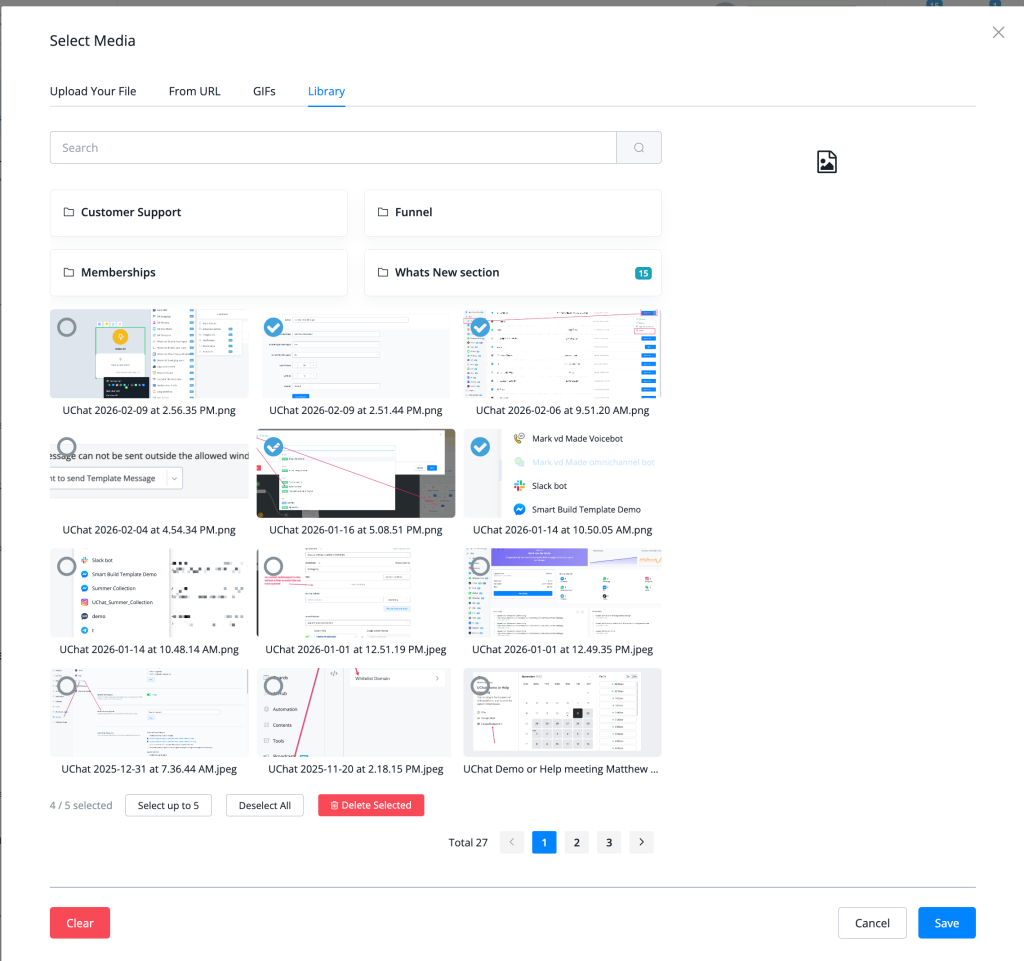
Feature: allow agent to select and send up to 5 images or files in live chat
Multi-File Upload in Live Chat — Send Up to 5 Images or Files at Once
Agents can now select and send up to 5 images or files simultaneously in the Live Chat media picker — eliminating the need to send attachments one at a time.
What's New
- 📎 Batch file selection — select up to 5 images or files in a single send action from the media picker
- 🖼 Multiple selection UI — the media library now shows checkmarks on selected items with a count indicator ("4 / 5 selected")
- 🔵 "Select up to 5" button — clearly indicates the maximum selection limit in the picker toolbar
- 🗂 Library, URL, GIF, and Upload tabs all support the updated multi-select behaviour
- 🗑 Bulk delete — selected items can be deleted in batch using the "Delete Selected" button
How to Use
- In Live Chat, open the media/attachment picker
- Switch to the Library tab (or use Upload Your File, From URL, or GIFs)
- Click to select up to 5 images or files — a blue checkmark appears on each selected item
- The toolbar shows the current selection count (e.g., "4 / 5 selected")
- Click Save — all selected files are sent as attachments in a single message action
Full documentation: Live Chat Feature — Multiple Files Upload
Why It Matters
- Agents supporting customers who need multiple screenshots, documents, or images no longer need to send them one by one
- Dramatically improves agent efficiency for support tickets involving product photos, invoices, or multi-step visual instructions
- Consistent with multi-file sending behaviour on popular messaging platforms like WhatsApp and Telegram