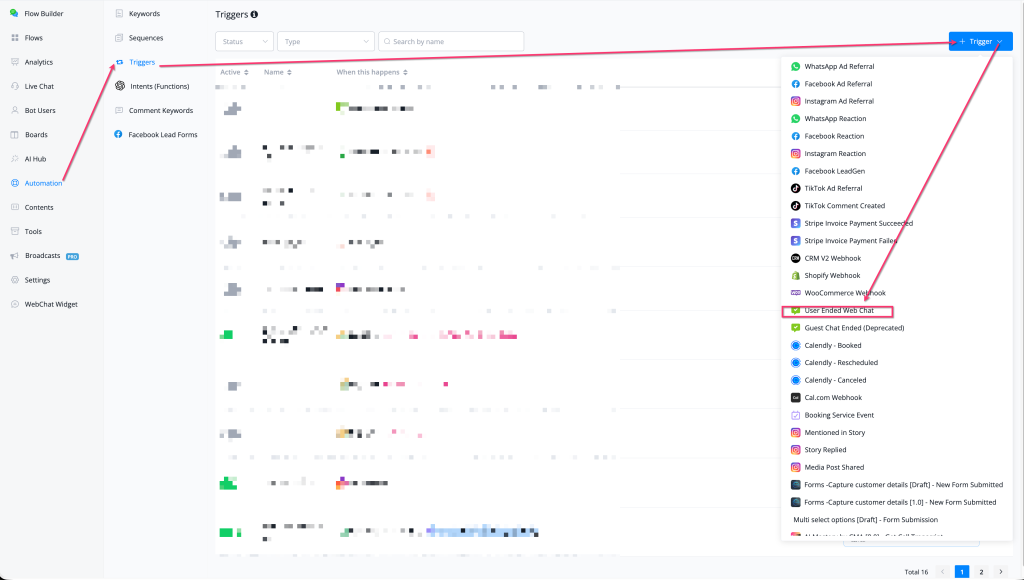
Feature: add User Ended Web Chat trigger for webchat widget
User Ended Web Chat — New Automation Trigger
A new trigger — User Ended Web Chat — is now available in Automation → Triggers, allowing you to fire a flow automatically when a user closes or ends a web chat session on your webchat widget.
What's New
- 🌐 New trigger: User Ended Web Chat — fires when a visitor ends a web chat session via the webchat widget
- 🔄 Replaces the now-deprecated Guest Chat Ended trigger (still available but marked as deprecated)
- ⚡ Available in Automation → Triggers → + Trigger → select "User Ended Web Chat"
- 🔗 Works with all webchat widget types (Chat Button, Embedded Chat, etc.)
How to Use
- Go to Automation → Triggers
- Click + Trigger (top-right)
- Scroll to the web chat section and select User Ended Web Chat
- Connect it to a flow — this flow will run automatically when a user ends a web chat session
Use Cases
- Send a follow-up message or survey after a web chat session ends
- Update a custom user field (e.g., last_chat_ended_at) when the session closes
- Trigger a re-engagement flow if the user didn't complete a key action during the chat
- Notify an agent or CRM when a visitor exits without converting
Why It Matters
- Enables post-chat automation — a common requirement for lead capture, CSAT surveys, and re-engagement sequences
- Supersedes the deprecated Guest Chat Ended trigger with a more accurate, user-scoped event
- Closes the web chat automation loop: trigger on open → interact → trigger on close
👉 Located at: Automation → Triggers → + Trigger → User Ended Web Chat Note: Guest Chat Ended is now deprecated — migrate existing triggers to User Ended Web Chat Published: March 13, 2026