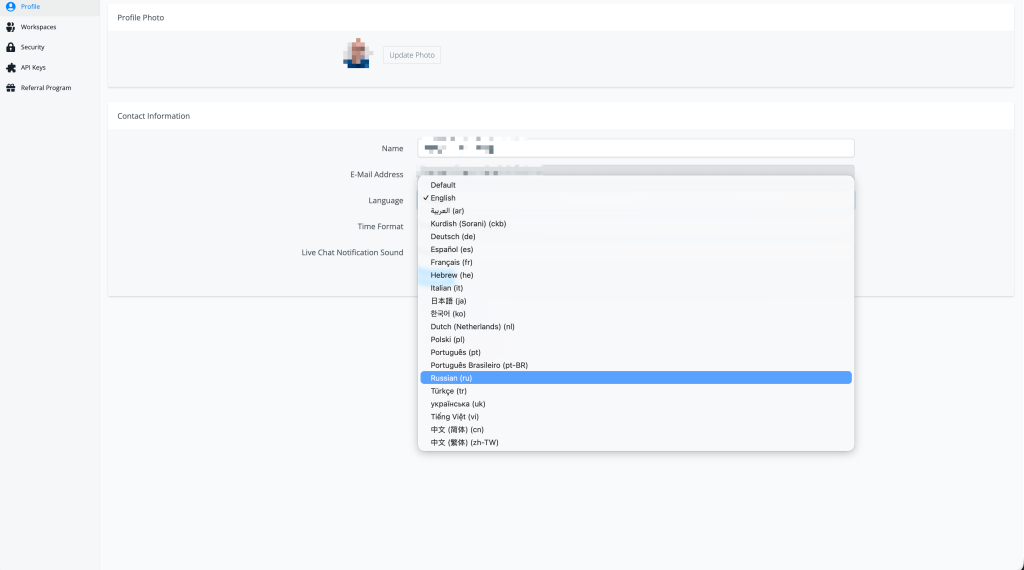
Feature: add new UI Language Russian
Russian Added as a UI Language
The UChat platform interface is now available in Russian (ru) — users can switch the entire UI to Russian from their Profile settings.
What's New
- 🇷🇺 New language: Russian (ru) — added to the Language selector in Profile settings
- 🌐 Full UI translation covering flow builder, live chat, analytics, and workspace settings
- ✅ Selected and confirmed as the active language — highlighted in the dropdown when chosen
How to Use
- Click your profile avatar (top-right) and go to Profile
- Under Contact Information, find the Language dropdown
- Select Russian (ru) from the list
- The UI will immediately switch to Russian
Full Language List (as of this release)
Default · English · العربية (ar) · Kurdish Sorani (ckb) · Deutsch (de) · Español (es) · Français (fr) · Hebrew (he) · Italian (it) · 日本語 (ja) · 한국어 (ko) · Dutch Netherlands (nl) · Polski (pl) · Português (pt) · Português Brasileiro (pt-BR) · Russian (ru) (new) · Türkçe